---
title: Tailor AYOA's AI to your needs with Neuro-Settings
description: Learn how to customise AI Mind Map generation with clear sentences, simplified language, special interests, and personalised layouts that cater to neurodivergent needs and preferences
---
[Skip to content](https://support.ayoa.com/tailor-ayoas-ai-to-your-needs-with-neuro-settings#main-content)
English
Show submenu for translations
[More support](https://support.ayoa.com/kb-tickets/new?hsLang=en)
[](https://ayoa.com/)
Open main navigation
Close main navigation
- English
Show submenu for translations
- [More support](https://support.ayoa.com/kb-tickets/new)
- [Sign in to AYOA](https://app.ayoa.com/)
[Sign in to AYOA](https://app.ayoa.com/)
How can we help you?
- There are no suggestions because the search field is empty.
1. [Help Centre](https://support.ayoa.com/?hsLang=en)
2. [AI](https://support.ayoa.com/ai?hsLang=en)
3. [AI Assistant](https://support.ayoa.com/ai?hsLang=en#ai-assistant)
July 28, 2025
# Tailor AYOA's AI to your needs with Neuro-Settings
## Learn how to customise AI Mind Map generation with clear sentences, simplified language, special interests, and personalised layouts that cater to neurodivergent needs and preferences
Watch this helpful explainer, or follow the steps below
The Neurodiversity settings for AYOA's AI help you tailor the content to your specific preference.
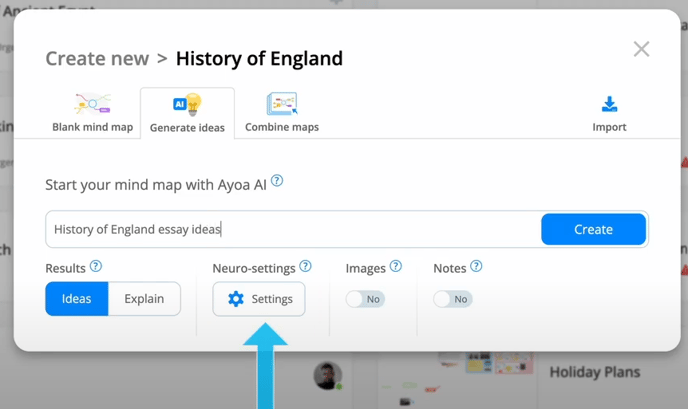
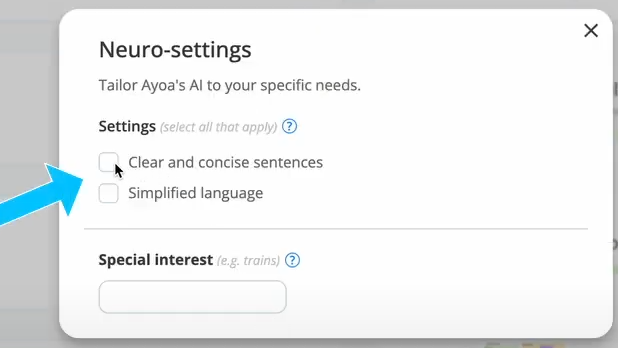
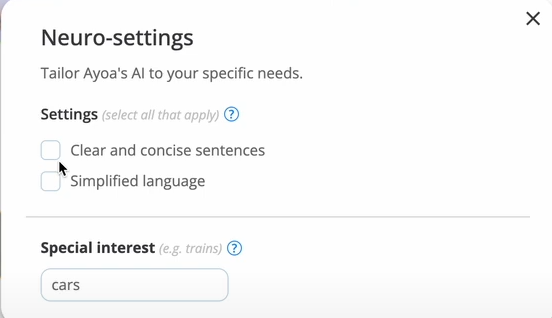
When you want to generate an AI mind map, you can access the Neuro settings menu to select your custom setting: Clear and concise sentences, or Simplified language, or both
The generated maps will then have an intuitive layout that caters to your chosen setting.
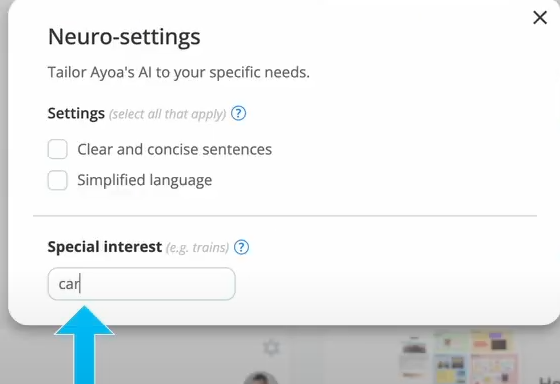
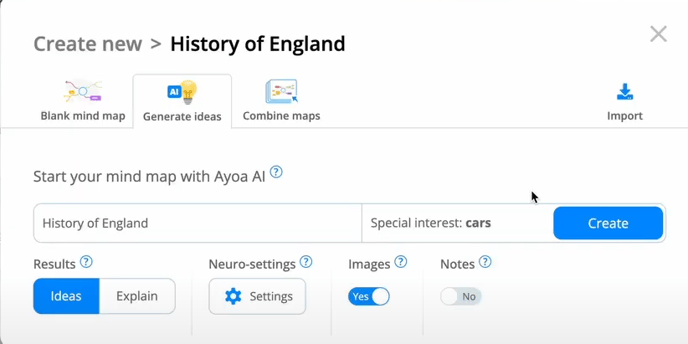
You can also add a keyword as a special interest to further tailor the content to your needs.
You'll also be able to access the neuro settings when using the AI Assistant to expand on your ideas.
Click on the AI option on the toolbar
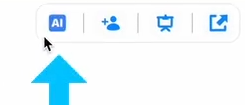
This will open up a new window where you can clicking on the settings.
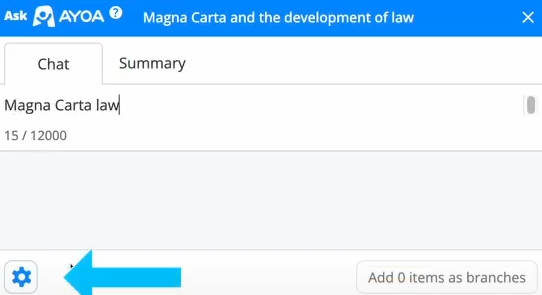
You can then select your custom setting: Clear and concise sentences, or Simplified language, or both.
- [Accessing AYOA](https://support.ayoa.com/accessing-ayoa?hsLang=en)
- [My AYOA Account](https://support.ayoa.com/my-ayoa-account?hsLang=en#main-content)
- [My Preferences](https://support.ayoa.com/my-ayoa-account?hsLang=en#my-preferences)
- [Managing your AYOA subscription](https://support.ayoa.com/my-ayoa-account?hsLang=en#managing-your-ayoa-subscription)
- [AYOA Team Plans](https://support.ayoa.com/ayoa-team-plans?hsLang=en)
- [AYOA Mobile](https://support.ayoa.com/ayoa-mobile?hsLang=en#main-content)
- [Account Management - Mobile](https://support.ayoa.com/ayoa-mobile?hsLang=en#account-management-mobile)
- [Ayoa Chat - Mobile](https://support.ayoa.com/ayoa-mobile?hsLang=en#ayoa-chat-mobile)
- [Mind Maps - Mobile](https://support.ayoa.com/ayoa-mobile?hsLang=en#mind-maps-mobile)
- [Task Boards and My Planner - Mobile](https://support.ayoa.com/ayoa-mobile?hsLang=en#task-boards-and-my-planner-mobile)
- [Whiteboards- Mobile](https://support.ayoa.com/ayoa-mobile?hsLang=en#whiteboards-mobile)
- [AYOA Chat](https://support.ayoa.com/ayoa-chat?hsLang=en)
- [Mind Maps](https://support.ayoa.com/mind-maps?hsLang=en#main-content)
- [Getting started with Mind Mapping in AYOA](https://support.ayoa.com/mind-maps?hsLang=en#getting-started-with-mind-mapping-in-ayoa)
- [How to use Mind Maps on the Web / Desktop](https://support.ayoa.com/mind-maps?hsLang=en#how-to-use-mind-maps-on-the-web-desktop)
- [Radial Maps](https://support.ayoa.com/mind-maps?hsLang=en#radial-maps)
- [Capture Maps](https://support.ayoa.com/mind-maps?hsLang=en#capture-maps)
- [iMindMap](https://support.ayoa.com/mind-maps?hsLang=en#imindmap)
- [Accessibility](https://support.ayoa.com/mind-maps?hsLang=en#accessibility)
- [AI](https://support.ayoa.com/ai?hsLang=en#main-content)
- [AI imports and prompts](https://support.ayoa.com/ai?hsLang=en#ai-imports-and-prompts)
- [AI Assistant](https://support.ayoa.com/ai?hsLang=en#ai-assistant)
- [Imports and Exports](https://support.ayoa.com/imports-and-exports?hsLang=en#main-content)
- [Imports](https://support.ayoa.com/imports-and-exports?hsLang=en#imports)
- [Exports](https://support.ayoa.com/imports-and-exports?hsLang=en#exports)
- [Task Management](https://support.ayoa.com/task-management?hsLang=en#main-content)
- [Task Boards](https://support.ayoa.com/task-management?hsLang=en#task-boards)
- [Workflow / Kanban](https://support.ayoa.com/task-management?hsLang=en#workflow-kanban)
- [Canvas](https://support.ayoa.com/task-management?hsLang=en#canvas)
- [Gantt Timeline](https://support.ayoa.com/task-management?hsLang=en#gantt-timeline)
- [Task Management](https://support.ayoa.com/task-management?hsLang=en#task-management)
- [Whiteboards](https://support.ayoa.com/whiteboards?hsLang=en#main-content)
- [Whiteboards](https://support.ayoa.com/whiteboards?hsLang=en#whiteboards)
[](https://ayoa.com)
[Get started for free](https://auth.ayoa.com/signup?email=)
[AYOA privacy policy](https://www.ayoa.com/privacy-policy/)
[Got a suggestion?](https://share-eu1.hsforms.com/1xuRuRa85Q-e8ya52b55HQwf4wbn)
[Our customers](https://www.ayoa.com/ourcustomers/)
Copyright © 2026, OpenGenius Ltd.